


 Subvolts take ChatGPT now uses interactive elements and visuals to make answers easier to understand and act on. Oct 19, 2026
 - Business
- This feature can streamline workflows by presenting data and options interactively, potentially speeding up decision-making and task completion within ChatGPT.
- Everyday users
- You can now get answers that are easier to understand and interact with directly, like seeing charts or filling out forms without leaving your chat.
ChatGPT now integrates interactive elements and visuals directly into conversations, improving user understanding and task completion.
Intelligent UI in ChatGPT

Intelligent UI lets ChatGPT combine text, visuals, and interactive elements in your conversations.
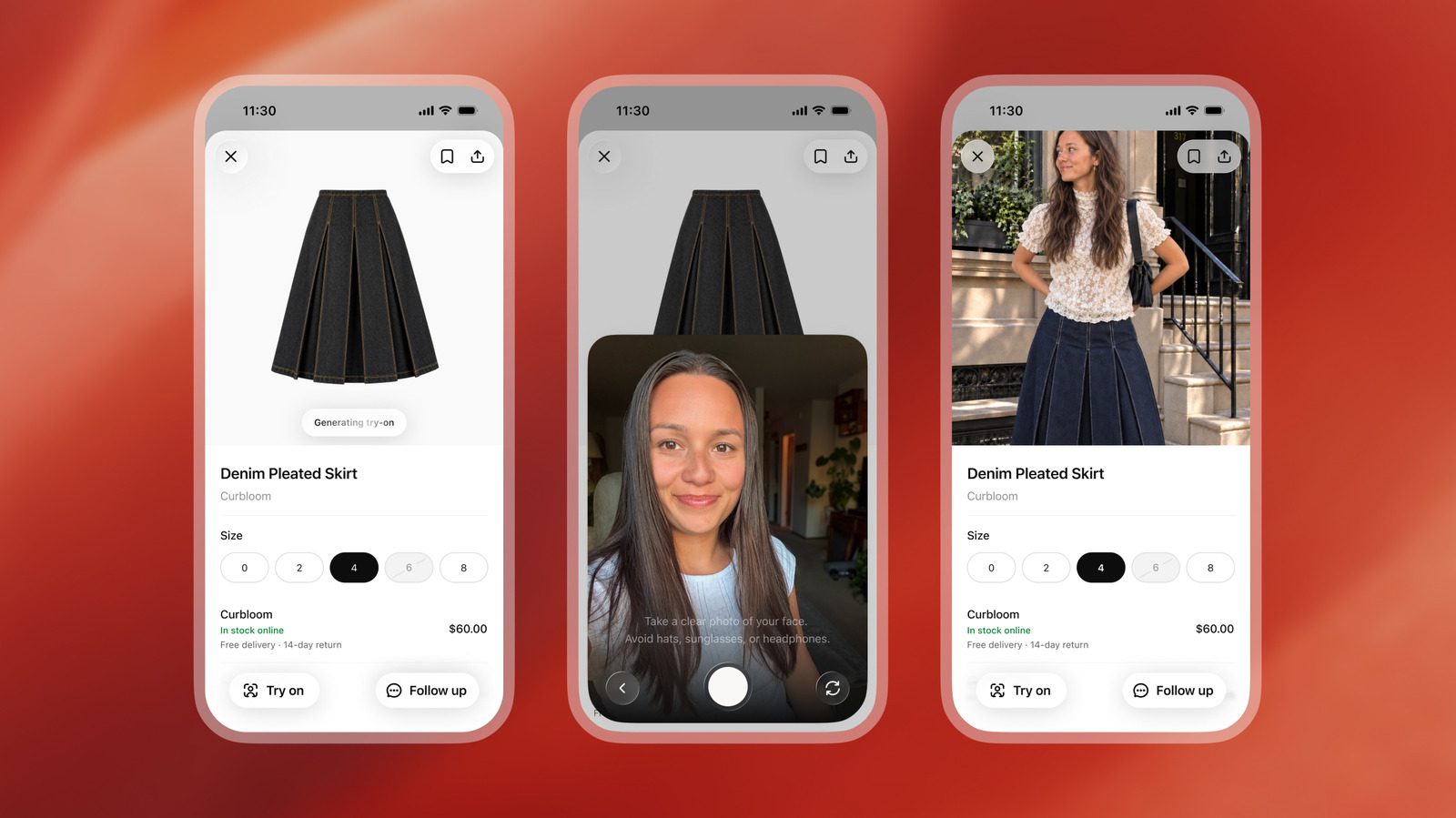
Intelligent UI lets ChatGPT shape each answer with the right layout, visuals, and interactivity for what you want to understand or do, directly in the conversation.
We’ve trained GPT-6 to compose responses using text, visuals, and interactive elements, choosing how they fit together based on your question. Responses can include graphics, tappable buttons, forms, charts, and interactive experiences you can use directly in your conversation.The format depends on what you’re asking. A comparison might work best side by side. An explanation might be easier to understand through an interactive diagram. And when a simple text answer is the most useful response, ChatGPT can give you that.
GPT-6 in ChatGPT is based on GPT-6 Sol for Plus, Pro, Business, and Enterprise, and GPT-6 Luna for Free and Go. Both are tuned for everyday conversation and support Intelligent UI.The Pro reasoning option uses GPT-6 Astra and does not support Intelligent UI.…
Opening of the original on OpenAI Help Center From Subvolts
Summary and analysis by Subvolts editorial, AI-assisted.
OpenAI's ChatGPT now uses Intelligent UI to combine text, visuals, and interactive elements directly within conversations. Trained on GPT-6, this feature adapts the response format, including graphics, buttons, forms, and charts, to better suit user queries. It aims to make understanding and completing tasks more intuitive, with different GPT-6 versions powering the experience across various subscription tiers.
ChatGPT can now show you answers with pictures, buttons, and forms right in your chat. This helps you understand complex things better or do tasks more easily, like filling out a form without leaving the conversation.
This update enhances ChatGPT's user interface by integrating dynamic elements, moving beyond static text. It affects all ChatGPT users, particularly those on paid tiers utilizing GPT-6 Sol or Luna. Competitors like Google Gemini and Anthropic's Claude also focus on richer, more interactive outputs. Future developments will likely see further integration of interactive components and personalized response styles, potentially blurring the lines between chatbots and functional applications.
- Feature: Intelligent UI
- Product: ChatGPT
- Models Supported: GPT-6 Sol, GPT-6 Luna
- Models Not Supported: GPT-6 Astra (Pro reasoning)
- Availability: Chat tab only
- Interactive Elements: Graphics, buttons, forms, charts, diagrams
- Intelligent UI
- A user interface that dynamically adapts its layout, visuals, and interactivity based on the content and user's intent.
- A smart way for ChatGPT to show answers using pictures, buttons, and interactive parts that change based on what you ask.
- GPT-6
- The sixth generation of OpenAI's Generative Pre-trained Transformer large language models, powering ChatGPT's advanced features.
- The latest AI brain powering ChatGPT, trained to create responses with text, visuals, and interactive elements.
Ask ChatGPT to compare two products. Observe if it uses a side-by-side layout or interactive elements. You can also ask it to explain a concept and see if it uses a diagram or interactive explanation.



The Playbook: reusable how-tos, prompts, configs and tips pulled out of the news. Pulled from this item and others like it.
- Setting tipChatGPT Custom Instructions for Response StyleGuide ChatGPT's response format using custom instructions for layout and content. · 2 min
- Setting tipChatGPT Simple Layout and Visuals SettingReduce visual and interactive elements in ChatGPT responses for a simpler display. · 1 min
- ToolChatGPT Intelligent UI with GPT-6ChatGPT can now generate interactive visuals, charts, forms, and buttons within responses. · 5 min
- ToolDeep research in ChatGPT Work and CodexConduct deep research across the web, files, and apps, then generate editable documents with citations. · 10 min
Questions people ask
- Does Intelligent UI work with all ChatGPT models?
- Intelligent UI works with GPT-6 Sol and GPT-6 Luna. The Pro reasoning option using GPT-6 Astra does not support it. It is available from Instant through Extra High reasoning levels.
- Can I control the visual style of responses?
- Yes, you can add preferences in Custom Instructions, like 'keep answers concise' or 'use tables'. You can also select a 'Simple' layout in settings to reduce visual and interactive elements.
- Does Intelligent UI work in the Work tab?
- No, Intelligent UI is available only in the Chat tab. Plugins like Gmail, Health, and Finance will continue to function in ChatGPT.
More from OpenAI Help Center 78 more
Page generated Oct 19, 2026. Summaries are Subvolts' own; the story belongs to OpenAI Help Center.