


 Subvolts take Unlock creative superpowers with ChatGPT's new image model, even if you're not an artist. Apr 29, 2026
 - Business
- Learn how to leverage ChatGPT's new image generation capabilities to create professional visuals for marketing, presentations, and UI mockups.
- Everyday users
- Discover how to easily create striking images for personal projects or social media without needing design skills, thanks to new AI tools.
This episode details practical applications of a significant new AI image generation model, making advanced creative tools accessible to a wider audience.
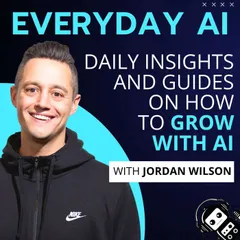
Ep 766: ChatGPT Images 2: How Even Non-Creatives Can Unlock Growth With Images 2
Audio streams from Everyday AI. Your place is remembered on this device.
From Subvolts
Summary and analysis by Subvolts editorial, AI-assisted.
This episode of Everyday AI features Jordan Wilson discussing ChatGPT's new Images 2 model. He explains how this tool empowers non-creatives to generate professional visuals for presentations, infographics, and editorial use. The discussion covers practical tips, real-world applications, and the model's advanced features like text rendering and QR code generation.
ChatGPT now has a new image tool called Images 2. It lets people who aren't artists create professional-looking pictures for things like presentations or websites. This means anyone can make cool visuals without needing special skills.
This episode is for anyone who needs to create visual content but lacks design skills. It highlights how OpenAI's latest image model democratizes creativity, offering a "creative superpower." Listeners learn practical ways to leverage Images 2 for business needs, from slide decks to marketing materials. This aligns with the current frontier lab focus on making AI tools accessible and powerful for everyday tasks, pushing the boundaries of multimodal AI capabilities.
- HostJordan Wilson
- Episode Title: Ep 766: ChatGPT Images 2: How Even Non-Creatives Can Unlock Growth With Images 2
- Show: Everyday AI
- Host: Jordan Wilson
- Length: 39 minutes
- Key Feature: ChatGPT Images 2 model
- Capabilities Mentioned: Editorial images, slide decks, infographics, QR codes, text rendering
"Not a creative"? 🧑🎨
That's no longer an excuse.
With ChatGPT's new Images 2 model, the gap between those that creatively can and those that can't has shrunk to basically nothing.
From creating striking editorial images without a camera or subject, to consultant-worthy slide decks and designer-inspired infographics, you all of a sudden have a creative superpower at your side in Images 2.
But how do you use it? And what are the tips to unlock its capabilities?
We'll go hands on and tell you all about it.
Newsletter: Sign up for our free daily newsletter
More on this Episode: Episode Page
Today's Episode on LinkedIn: Thoughts on this? Join the convo on LinkedIn and connect with other AI leaders.
Upcoming Episodes: Check out the upcoming Everyday AI Livestream lineup
Website: YourEverydayAI.com
Email The Show: info@youreverydayai.com
Connect with Jordan on LinkedIn
Topics Covered in This Episode:
- ChatGPT Images 2: New Thinking Mode
- Real-World Grounded AI Image Generation
- Cohesive Multi-Image Creation from Prompts
- Near-Perfect Text Rendering in Images 2
- AI-Generated Functional QR and Barcodes
- Business Use Cases for ChatGPT Images 2
- Slide Deck and UI/UX Mockup Generation
- Multilingual and Localization Image Outputs
- Comparing ChatGPT Images 2 vs. Competitors
- AI-Driven Creative Workflow for Non-Creatives
Timestamps:
00:00 Explaining the thinking mode feature
05:17 Advancements in AI image realism
07:54 Explaining visual thought process
13:01 Discussing AI limitations in design
15:37 Creating UI specs without designers
17:18 Practical business enhancement strategies
21:47 Creating slide decks efficiently
26:32 Creating UI mockups for presentations
27:16 Creating a polished UI mockup
30:33 Discussing creative presentation tools
35:33 Democratizing creativity for non-creatives
37:29 Wrapping up and subscribing
Keywords:
ChatGPT Images 2, OpenAI, AI image generation, visual thinking, design bottleneck, legible text on images, UI mockups, character consistency, multilingual outputs, visual creativity, thinking mode, live web search, current data, generative AI, creative briefs, Midjourney, Nano Banana, DALL-E, Google, LM Arena, blind tests, ELO score, UI/UX specs, coding agents, product packaging mockups, UGC ad creatives, instant localization, YouTube thumbnails, training visuals, sales one pagers, boardroom strategy maps, live data infographics, before and after shots, marketing teams, product managers, chain of thought, prompt engineering, design iteration, business utilities,
- Multimodal
- This refers to AI systems that can process and understand information from multiple types of data, such as text, images, and audio.
- AI that understands different kinds of information, like words and pictures together.
53 min44 min 38 min
Why AI needs a new kind of supercomputer network - Episode 18
WithMark Handley, Greg Steinbrecher
 1 h 23
 46 min
From Vector Databases to Knowledge Engines: The Next Layer of AI
WithAsh Ashutosh
 1 h 01
Questions people ask
- What is the main benefit of ChatGPT's Images 2 model?
- The Images 2 model significantly shrinks the gap between those who can create visually and those who cannot, empowering non-creatives.
- What kind of business uses are discussed for Images 2?
- Use cases include creating editorial images, consultant-worthy slide decks, designer-inspired infographics, and AI-generated functional QR codes.
Page generated Oct 19, 2026. Summaries are Subvolts' own; the audio, artwork and notes belong to Everyday AI.